


Email was supposed to end paper invoices. In a lot of businesses it hasn't. Lab work arrives in a box with an invoice tucked inside, supply cartons carry a packing slip, the equipment technician hands over a handwritten service bill, and the landlord still posts the rent invoice. By Friday the front desk has a pile.
This guide is for practices and small businesses where most supplier invoices still arrive on paper: dental practices first, but also medical and veterinary clinics, restaurants, auto workshops, trades and farms. It shows how to turn that pile into entries in QuickBooks Online, Xero, Sage, MYOB or FreshBooks with a document scanner, and without typing invoices in by hand.
Why paper invoices are still common in dental practices
A dental practice buys from a small number of suppliers, very often. Practice-management benchmarks commonly put dental supplies at about 5–7% of collections and lab fees at about 8–12% (Dental Economics, Rework). Each crown, denture, night guard and aligner case comes back from the lab with its own paperwork, so lab fees turn into a steady stream of invoices.
Much of that paper never goes through email at all:
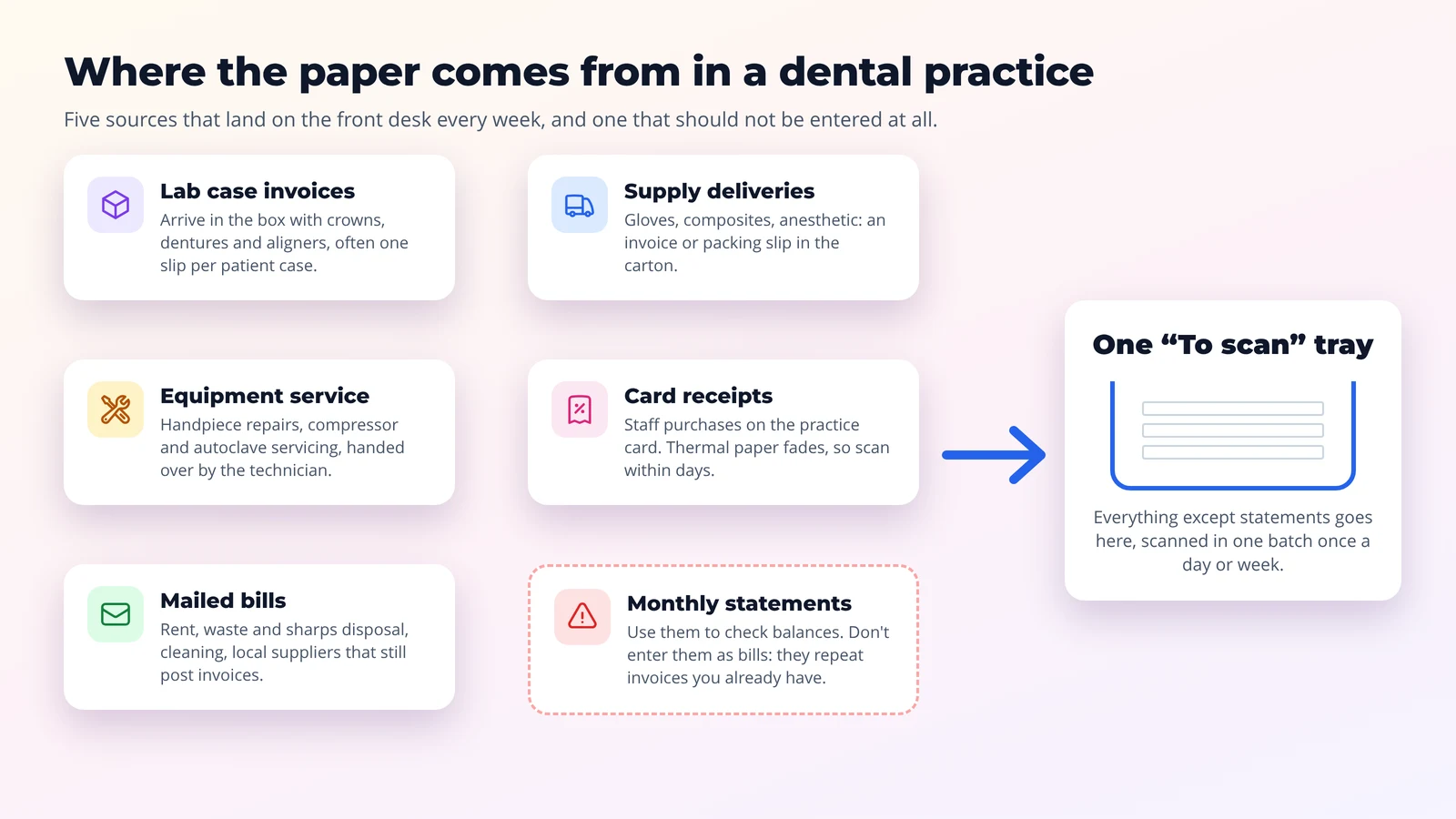 Where the paper comes from in a dental practice
- Lab case invoices arrive with the case, often one slip per patient.
- Supply deliveries (gloves, composites, anesthetic, infection-control products) carry an invoice or packing slip in the carton.
- Equipment service for handpieces, compressors, suction and autoclaves is often billed on the spot.
- Card receipts from staff purchases are printed on thermal paper, which fades.
- Mailed bills still come from landlords, waste and sharps disposal, cleaners and small local suppliers.
- Monthly statements from supply houses and labs list invoices you already have. Use them to check balances, but don't enter a statement as a bill, or you'll pay twice.
What a paper pile actually costs
Typing invoices in by hand isn't free. Ardent Partners' 2025 accounts payable benchmark puts the average cost of processing one invoice at $9.40, against $2.78 for best-in-class teams that automate capture (Ardent Partners via WEX). Most of the difference is the time spent keying, checking and filing.
For a small practice the bigger costs are often less visible:
- Late or missed payments when an invoice sits in a drawer until the statement arrives.
- Duplicates when a statement gets entered on top of the invoices it summarizes.
- Faded receipts. The ATO specifically recommends keeping digital copies of card receipts because they fade (ATO).
- Year-end scrambles when your accountant asks for the invoice behind a transaction and it's in a box somewhere.
Is a scan as good as the paper original?
In most places, yes, if the scan is clear and complete and you can find it again:
- United States: IRS Rev. Proc. 97-22 lets businesses keep books and records in an electronic storage system and destroy the paper originals, provided the copies are accurate, legible and can be retrieved for the IRS.
- Australia: the ATO accepts digital images of paper records that are "true and clear reproductions" (ATO digital record keeping).
- United Kingdom: HMRC requires you to keep "all invoices you receive (original or electronic copies)", generally for at least 6 years (GOV.UK).
When Scan2Invoice sends a bill, it attaches the scanned invoice to that bill in your accounting software, so the image sits right next to the transaction it supports. Your accountant can confirm whether you can shred the originals after scanning, and how long to keep anything you hold on to.
Turn Your Paper Pile into Bills in Minutes
Scan2Invoice connects your desktop scanner to QuickBooks Online, Xero, Sage, MYOB and FreshBooks. Scan a stack once and send each invoice with the scan attached. Free for 30 days.
Download NowThe paper invoice workflow, step by step
The goal is simple: you handle the paper, and the software handles the typing. Six steps, most of them seconds long.
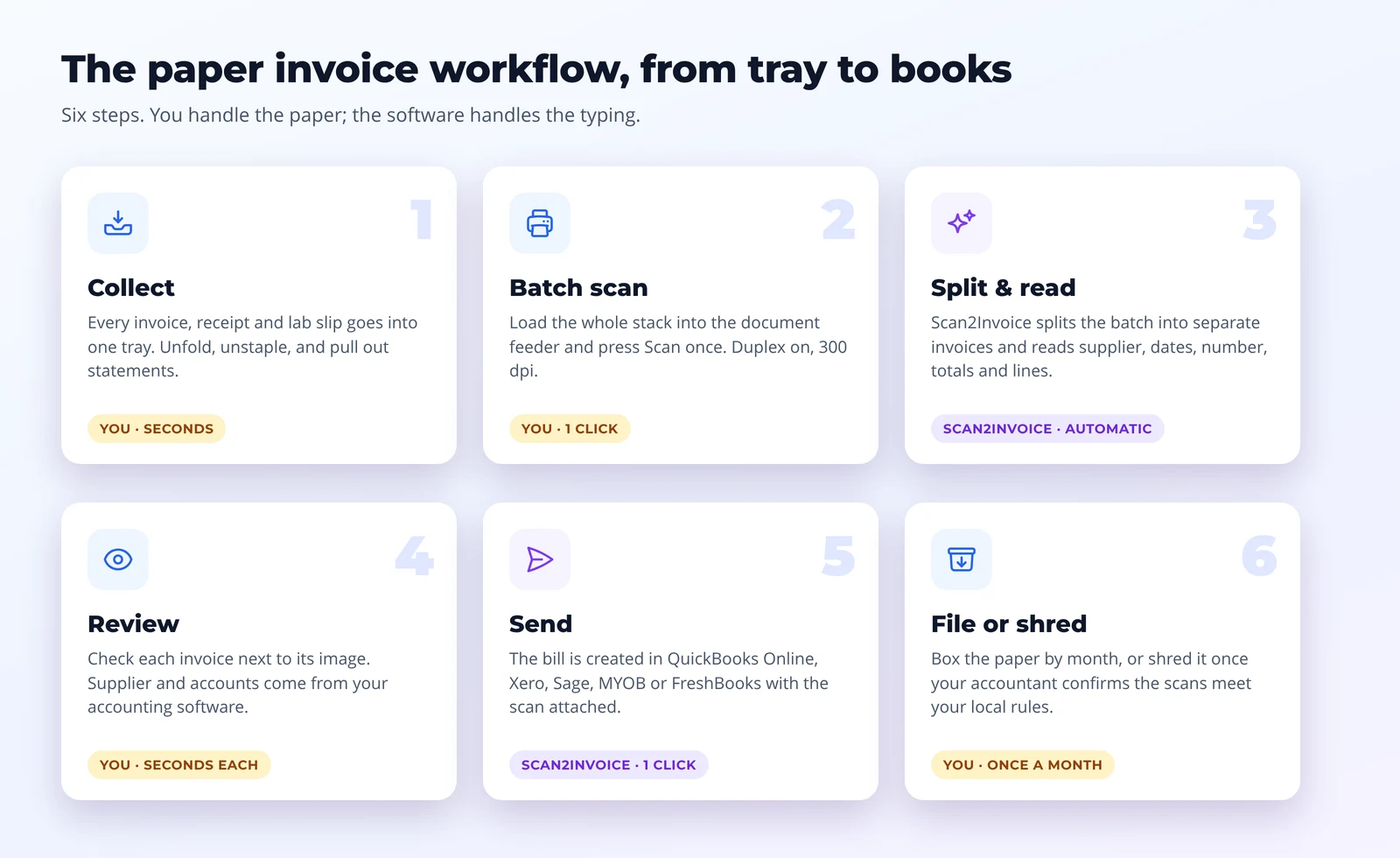 The paper invoice workflow, from tray to books
1. Collect everything in one tray
Pick one tray labeled "To scan" and make it the only place supplier paper goes: lab slips, delivery invoices, service bills, receipts and mail. When the paper comes in, take out staples, unfold it and pull out monthly statements. That takes seconds per document and makes the scan reliable.
2. Scan the whole stack at once
Load the stack into the scanner's document feeder and press Scan in Scan2Invoice. There's no need to scan one invoice at a time. Turn on duplex, so payment terms or extra lines on the back are captured too.
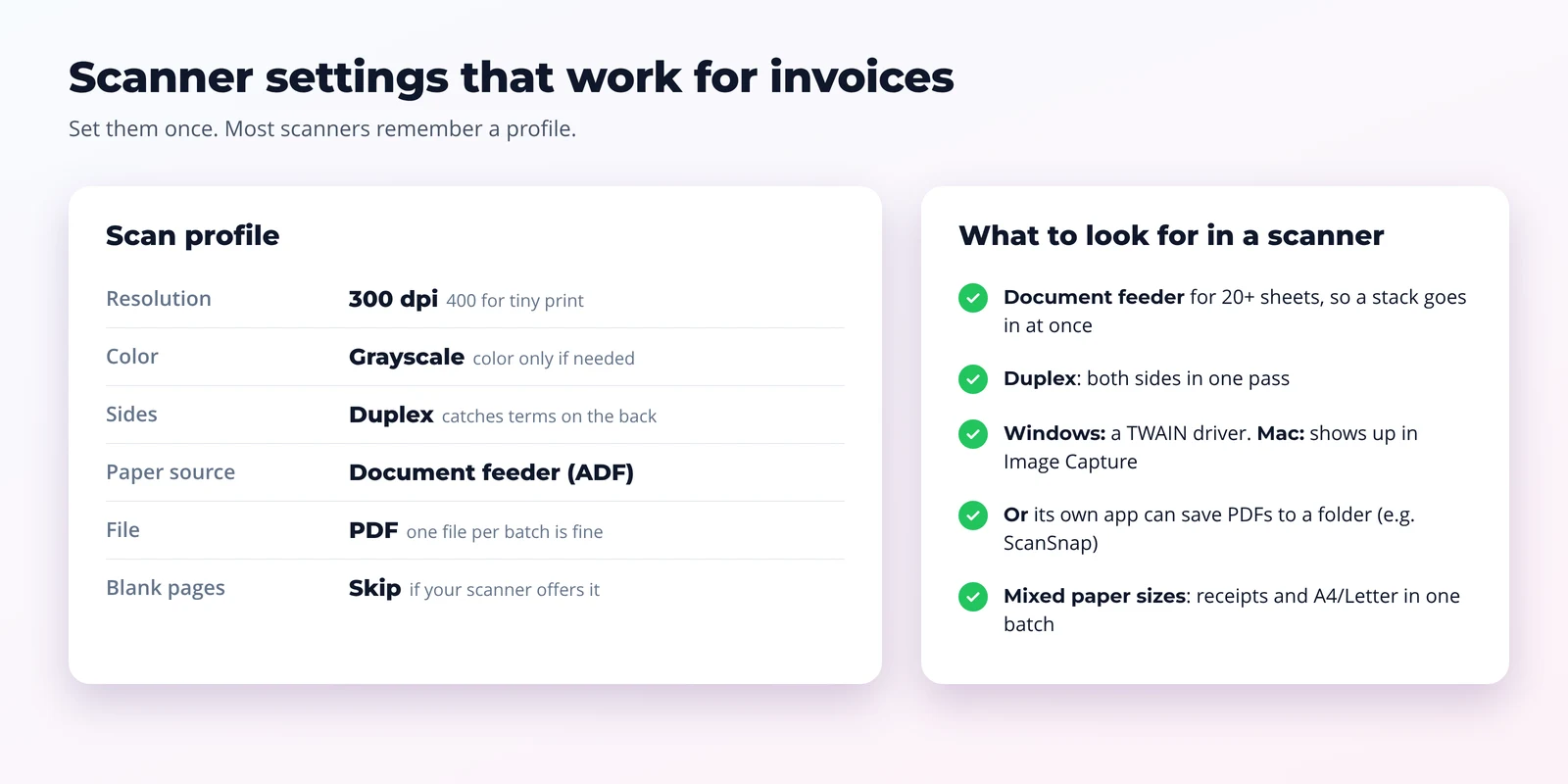 Scanner settings that work for invoices
Settings that work well for invoices:
| Setting | Use | Why |
|---|---|---|
| Resolution | 300 dpi (400 for very small print) | 300 dpi is the common recommendation for text recognition. Higher rarely helps and makes files bigger. |
| Color | Grayscale | Clear text and small files. Use color only for invoices with colored stamps or highlights you need to keep. |
| Sides | Duplex | Catches anything printed on the back. Turn on blank-page removal if your scanner has it. |
| Paper source | Document feeder (ADF) | One stack, one click. |
In Scan2Invoice's scan settings you can switch on the document feeder, duplex and grayscale, and open your scanner's own dialog for its other options.
3. Let the software split and read the batch
Scan2Invoice splits the batch into separate invoices, using page numbers such as "Page 1 of 2" to keep multi-page invoices together. It then reads each one: supplier, invoice date, due date, invoice number, totals, tax and line items. Rules you set up per supplier fill in the same account and details every time.
If an invoice has several pages but no page numbers, scan it on its own so it stays in one piece.
4. Review each invoice next to its image
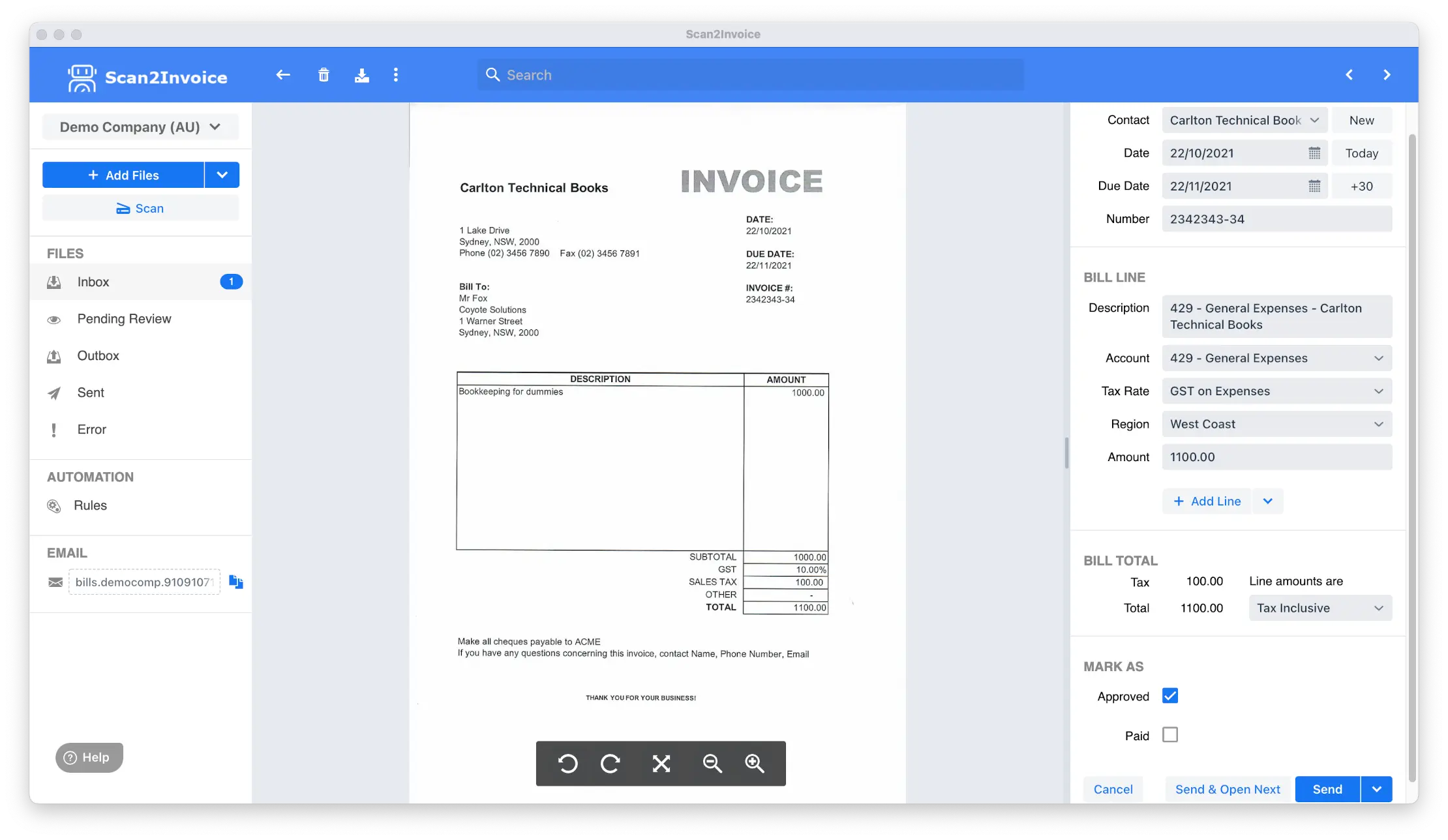 Review extracted invoice data next to the scan
The review screen shows the scan beside the extracted data. Suppliers, accounts, tax rates and tracking categories come straight from your accounting software, so you pick from your own lists. Most invoices only need a glance.
5. Send the bill to your accounting software
Click Send (or Send & Open Next to keep going). Scan2Invoice creates the bill in QuickBooks Online, Xero, Sage Accounting, MYOB Business or FreshBooks, and attaches the scanned invoice to it. It's then ready to approve, pay and reconcile.
6. File or shred the paper
Put the scanned paper in a box labeled with the month. Once your accountant has confirmed your scans meet your local record-keeping rules, you can shred it on a schedule instead of storing it for years.
A routine that sticks
Workflows fail when they depend on someone finding a spare hour. Make it small and regular instead:
- Daily (2 minutes): everything supplier-related goes in the tray. Scan card receipts the same day, before they fade.
- Once or twice a week (10–15 minutes): scan the tray, review and send.
- Monthly (10 minutes): check each supplier's statement against the bills in your accounting software, then box or shred the month's paper.
Give the job to one person at the front desk or in the office, and name a backup for holidays.
Dental practices: two things to watch
Lab invoices with patient names. Many lab invoices list the patient's name next to the work done, such as "J. Smith, upper partial denture". That's patient information on a financial document. Handle it under your practice's privacy obligations, such as HIPAA in the US. Many labs can show a case number instead of the patient's name on invoices; ask yours. Check with your compliance adviser before routing those invoices through any outside service.
Statements versus invoices. Supply houses and labs often send both. Enter the invoices, and use the statement only to check that nothing is missing. If an invoice is missing, ask the supplier for a copy rather than entering the statement total.
Other businesses with the same paper problem
The same workflow fits any business where paper arrives with deliveries or by mail:
| Business | Paper that piles up | Tip |
|---|---|---|
| Medical and veterinary clinics | Drug and supply deliveries, lab and referral invoices, equipment service | Same as dental: check lab and referral invoices for patient details. |
| Restaurants and cafés | Delivery invoices signed at the back door, credit notes for short deliveries | Scan the signed copy with any credit note, so the bill matches what actually arrived. |
| Auto repair shops and trades | Parts invoices with every delivery, supplier dockets | Scan daily. Parts invoices are easier to match to jobs while they're fresh. |
| Farms | Feed, fuel, vet and contractor invoices | Keep a tray in the farm office and scan weekly. Thermal fuel receipts fade quickly. |
| Property managers | Contractor and utility invoices for many properties | Assign each bill to its property with your accounting software's tracking categories or classes. |
Cut the paper at the source
Scanning is the fix for paper you can't avoid. For the rest:
- Ask suppliers to email invoices to your own Scan2Invoice email address. Many will, and those invoices then arrive without a scan.
- Snap a photo of a receipt with the mobile app when you're away from the scanner.
- Already using ScanSnap or another scanner app? Point its "save to folder" profile at a watched folder, and Scan2Invoice imports each new PDF automatically.
Get started
- Download Scan2Invoice for Windows or Mac and connect your accounting software.
- Plug in your scanner and choose it in the scan settings: feeder on, duplex on.
- Scan this week's pile and send the first invoices.
Scan2Invoice is free for 30 days, and paid plans start at US$6.50 a month. See pricing.
Frequently asked questions
Answers to common questions about scanning paper invoices. For more details, check our knowledge base.
Can I throw away paper invoices after scanning them?
Often, yes. In the US, IRS Rev. Proc. 97-22 lets businesses destroy paper originals when their electronic copies are accurate, complete, legible and retrievable. The ATO in Australia accepts true and clear digital reproductions of paper records, and HMRC in the UK accepts electronic copies of VAT invoices, kept for at least 6 years. Rules differ by country and some records have special requirements, so confirm with your accountant before shredding.
What kind of scanner do I need to scan invoices?
A desktop document scanner with an automatic document feeder (ADF) for 20 or more sheets and duplex scanning. On Windows it needs a TWAIN driver; on a Mac it should show up in Apple's Image Capture. Scanners whose own software saves PDFs to a folder, such as Fujitsu/Ricoh ScanSnap models, also work through a watched folder.
Can I scan a whole stack of different invoices at once?
Yes. Scan the stack as one batch. Scan2Invoice splits it into separate invoices using page numbers such as 'Page 1 of 2'. Check the split on the review screen, and scan a multi-page invoice on its own if it has no page numbers.
Which accounting software does Scan2Invoice work with?
QuickBooks Online, Xero, Sage Accounting, MYOB Business and FreshBooks. Each scanned invoice becomes a bill (or an expense in FreshBooks) with the original scan attached.
Our dental lab invoices list patient names. Is that a problem?
It can be. A lab invoice that names the patient and the work done contains patient information, so handle it under your practice's privacy policy, for example HIPAA in the US. Many labs can print a case number instead of the patient's name on invoices. Ask your lab, and check with your compliance adviser before routing those invoices through any outside service.
Does Scan2Invoice work on a Mac?
Yes. Scan2Invoice is available for Windows and Mac, and the Scan button works with scanners on both. The web edition, BillBjorn, uses the same account but cannot scan directly.